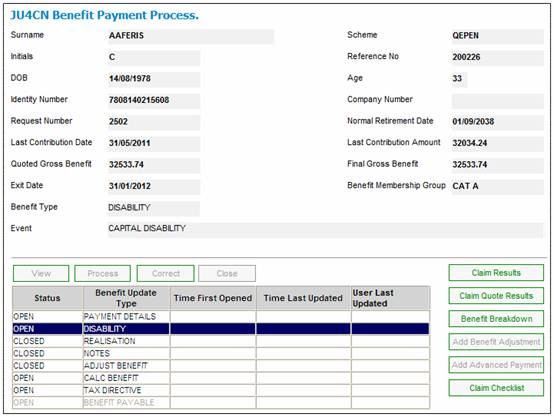
This section covers the additional screens required for processing a disability exit type.
The processing of a disability claim (standard benefits plus GLA) is similar to a disability claim (standard benefits only), except that the disability claim (with GLA) also has a DISABILITY screen.
From the JU4CN Benefit Payment Process screen, highlight DISABILITY, then click PROCESS.
The JU4B1 Risk Benefit (Disability) Decision screen will be displayed.
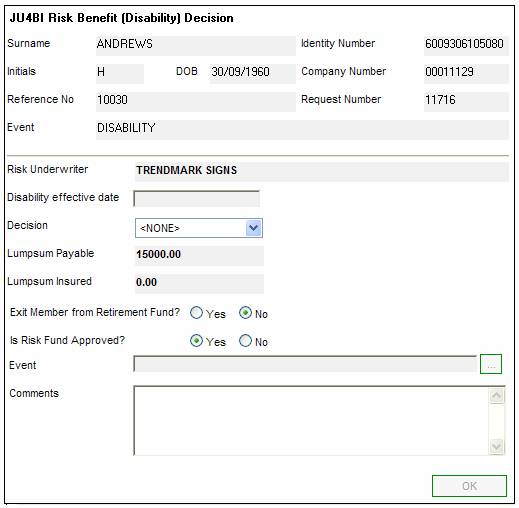
The following fields can be updated:
|
Disability effective date |
The date from which a disability claim is effective |
|
Decision |
Whether the claim is declined or whether a lump sum or PHI benefit is payable (selected from a drop-down list). |
|
Lumpsum Payable |
The amount of the lumpsum payable benefit. |
|
Lumpsum Insured |
The amount of the lumpsum insured benefit. |
|
Exit member from Retirement Fund? |
Click on the Yes or No button to indicate whether the member must be exited. |
|
Is Risk Fund Approved? |
Click on the Yes or No button to indicate whether the Risk Fund applicable is approved for tax. |
|
Event |
If EXIT MEMBER FROM RETIREMENT FUND = YES, click LINK and select the appropriate benefit event from the list displayed. |
|
Comments |
Any comments relating to the Disability Claim |
Return to the JU4CN Benefit Payment Process screen, then click CLOSE to close this update type.